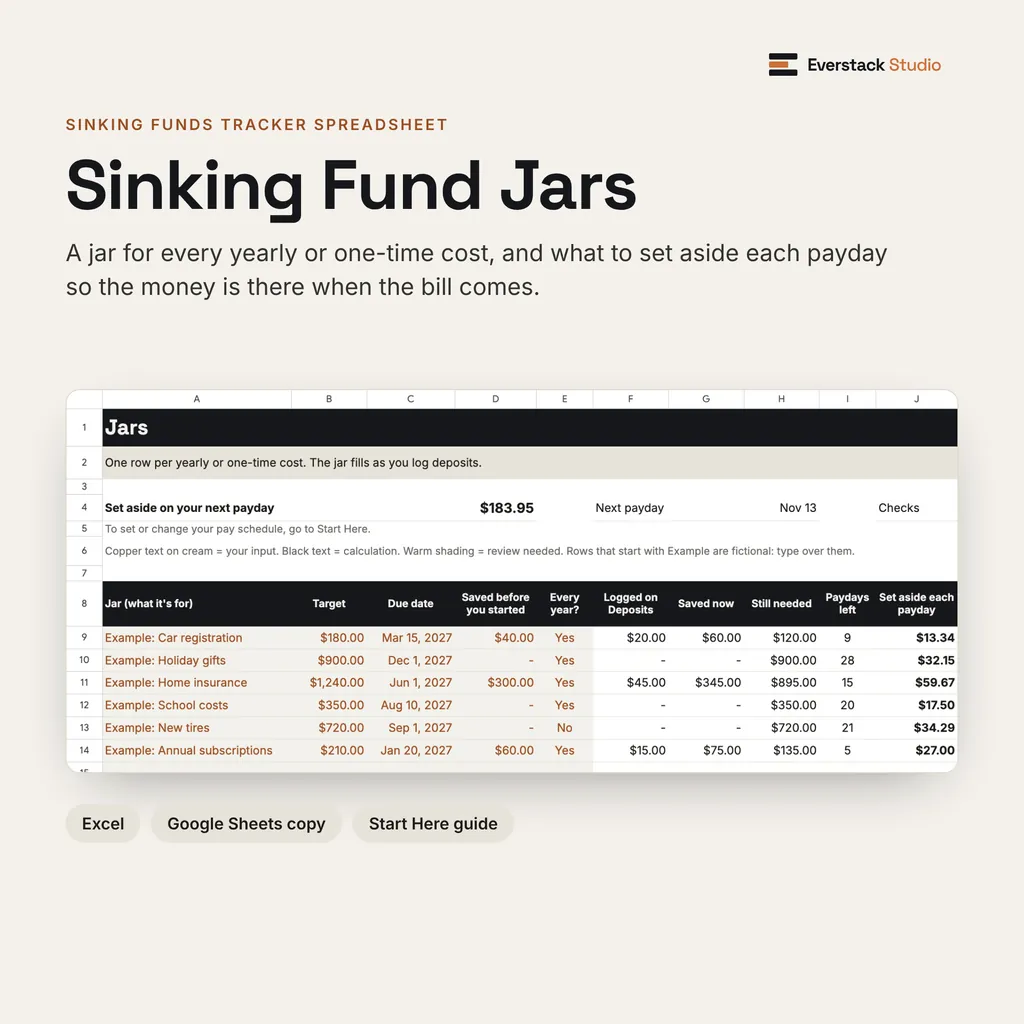
A jar for every yearly cost, filled one payday at a time.
Open largerKnow what to set aside each payday for every yearly bill
A jar for every yearly or one-time cost. It shows what to set aside each payday so the money is there when the bill comes. Excel, with a Google Sheets copy.
Sinking Fund Jars
- Set-asides follow your paydays, not the calendar: weekly, every 2 weeks, twice a month or monthly.
- Each jar counts the paydays left before its due date and rounds up to the cent, so it's full in time.
- Log deposits, and bills paid out of a jar, and each jar fills as you go.
- See one total to set aside on your next payday, and what your yearly costs come to per payday once every jar is caught up.
- 12 built-in checks catch text in number cells, negatives, duplicate names, entries outside the tables and broken formulas, and say what to fix.
No bank connection
It works only with the numbers you enter.
Visible formulas
Nothing hidden behind a black box.
Real screens from the files you get
A sinking funds spreadsheet: a jar for each yearly or one-time cost, what to set aside each payday, and a deposits log. Excel, with a Google Sheets copy.
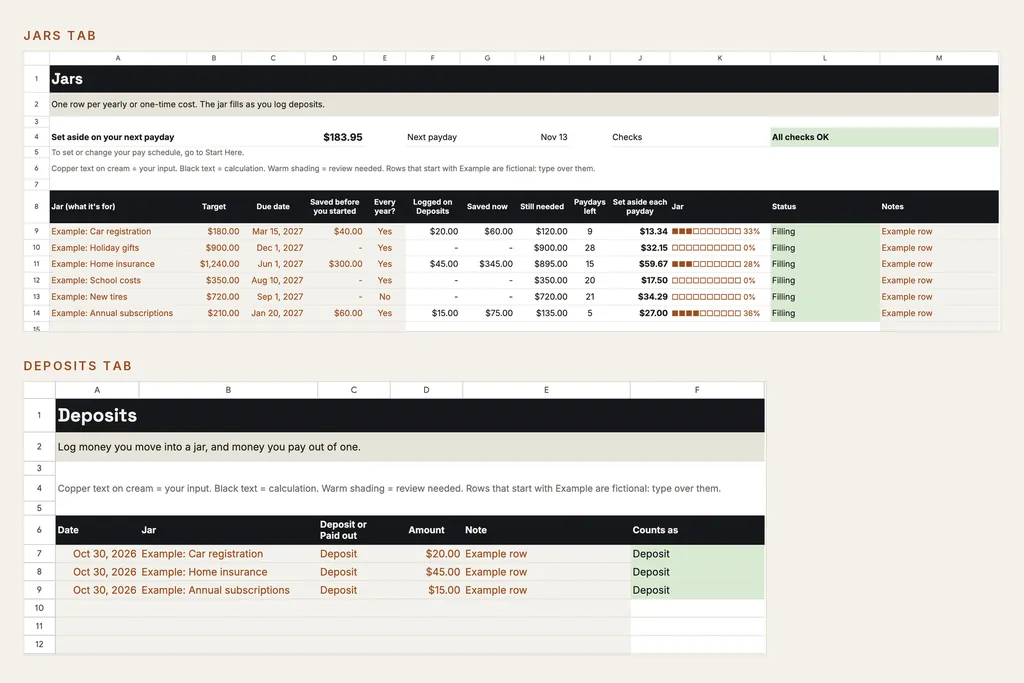
Each jar shows what to set aside each payday. Log deposits and it fills.
Open larger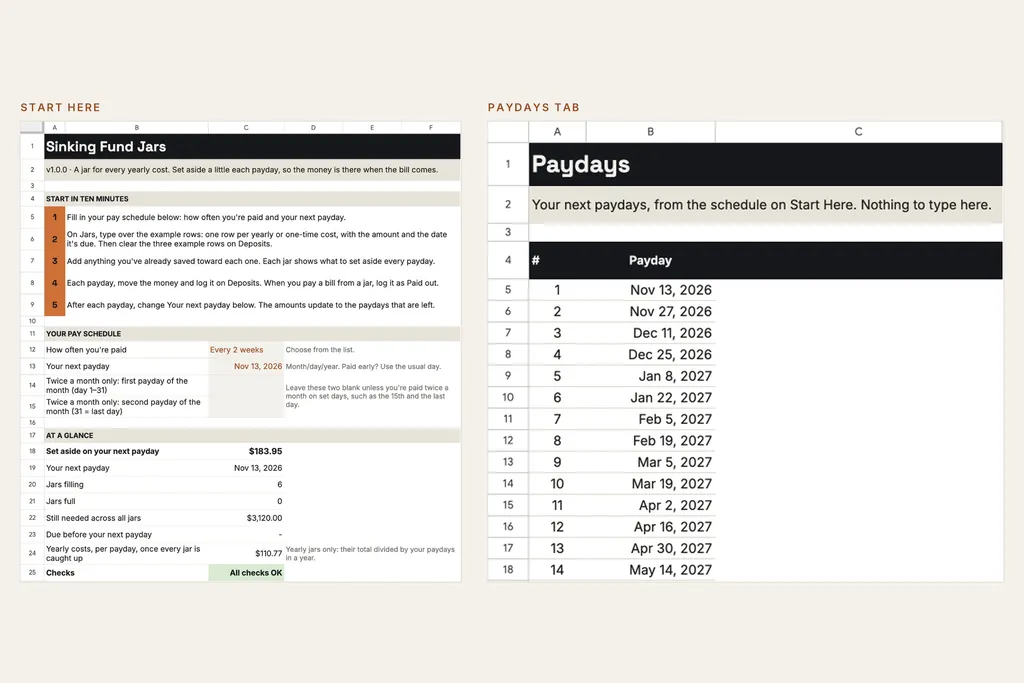
Set your pay schedule, and every jar counts your real paydays.
Open larger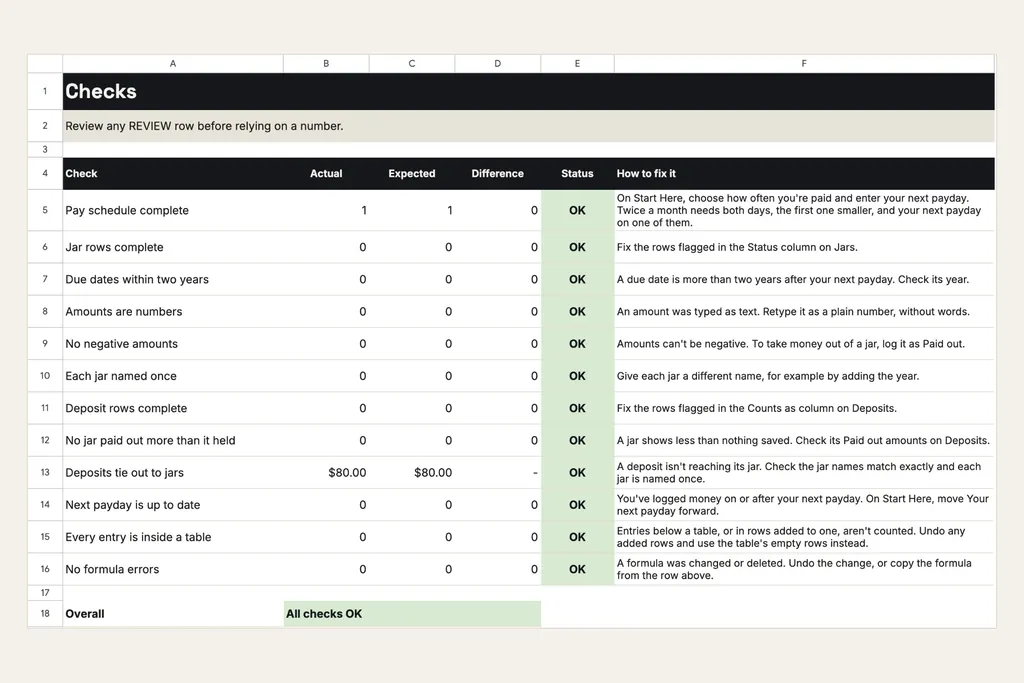
12 checks, and each one says what to fix.
Open larger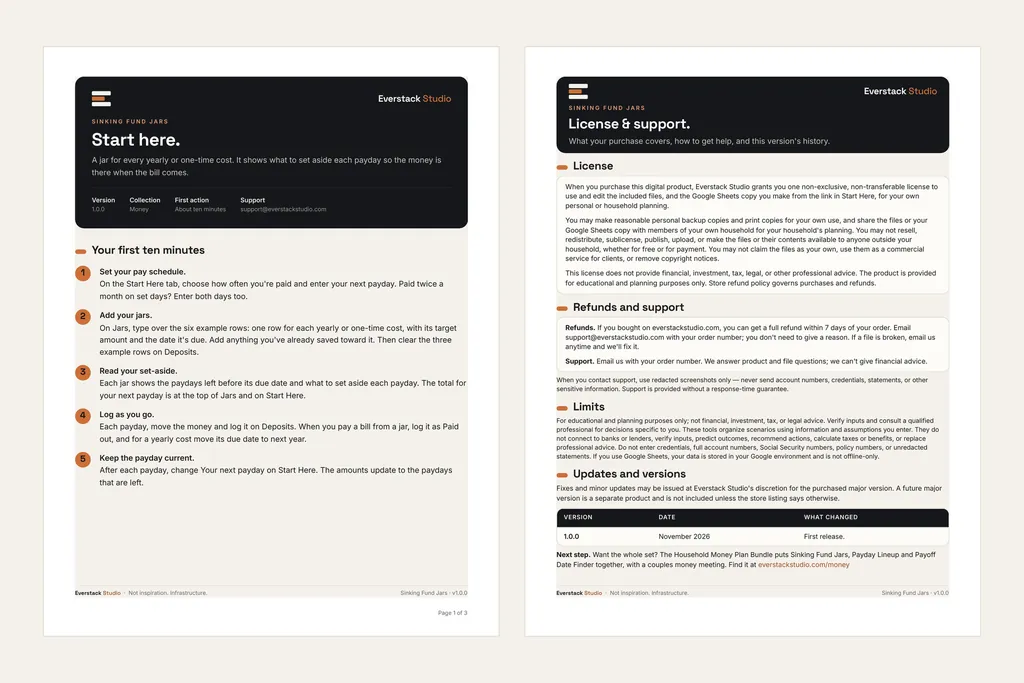
Start Here walks you through your first ten minutes, as numbered steps.
Open largerFiles in this download
- 01 Start Here (PDF, 3 pages): your first ten minutes, how the numbers work, the Google Sheets link, privacy and limits.
- 02 Sinking Fund Jars (Excel): Start Here, Jars, Deposits, Paydays and Checks tabs. Room for 25 jars and 300 deposits.
- A Google Sheets copy: open the link in Start Here while signed in to Google, choose Make a copy, and it saves to your own Google Drive.
- 03 License and Support (PDF).
Your first session
- 1On Start Here, choose how often you're paid and enter your next payday. Paid twice a month on set days? Enter both days too.
- 2On Jars, type over the six example rows: one row for each yearly or one-time cost, with its target, due date and anything you've already saved.
- 3Each jar shows the paydays left, what's still needed and what to set aside each payday. The total for your next payday sits at the top of Jars and on Start Here.
- 4Each payday, log what you moved on Deposits. When you pay a bill from a jar, log it as Paid out, and for a yearly cost move its due date to next year.
- 5After each payday, change Your next payday on Start Here, and the amounts update to the paydays that are left.
Household Money Plan Bundle
Want the whole set? The Household Money Plan Bundle puts Sinking Fund Jars, Payday Lineup and Payoff Date Finder together, with a couples money meeting. Coming in December.
Is this the right tool for you?
Good fit
Households planning for costs that don't come every month: registration, insurance, gifts, school costs, subscriptions.
Not designed for
Connecting to a bank, moving money, or deciding what you can afford. It works with the targets, dates and deposits you enter.
What this product does and does not do
- The workbook is built for desktop Microsoft Excel on Windows or Mac. Apple Numbers isn't supported.
- The Google Sheets copy works in Google Sheets in a web browser and in the Google Sheets app. Making your copy needs a free Google account, and your entries are then stored in your Google account.
- The Start Here and License PDFs open in any PDF reader.
- These tools organize scenarios using information and assumptions you enter. They do not connect to banks or lenders, verify inputs, predict outcomes, recommend actions, calculate taxes or benefits, or replace professional advice.
- A set-aside amount is arithmetic on the targets and dates you enter. It is not an instruction to move money or a judgment of what you can afford.
- Do not enter credentials, full account numbers, Social Security numbers, policy numbers, or unredacted statements. If you use Google Sheets, your data is stored in your Google environment and is not offline-only.
- The names and amounts in the examples and photos are fictional.
- Made with AI assistance: Everstack Studio created this spreadsheet with the help of AI tools. Every formula and page was reviewed and tested before release.
- For educational and planning purposes only; not financial, investment, tax, or legal advice. Verify inputs and consult a qualified professional for decisions specific to you.
License
Personal and household use: you may share it with people in your household for your household's planning. No resale, redistribution, public sharing, sublicensing, or commercial use. Fixes and minor updates may be issued at Everstack Studio's discretion for v1.x. Refunds follow the store policy shown at checkout.
See the refund policy and terms.
Common questions
Can I use Google Sheets instead of Excel?
Yes. Start Here has a link that makes your own copy in Google Sheets. It works in a web browser and in the Google Sheets app, and you need a free Google account. Your entries are then stored in your Google account.
What if I'm paid twice a month?
Choose Twice a month on Start Here and enter both paydays, such as the 15th and the last day, with your next payday on one of them. Each jar counts the paydays left from your schedule.
Does it connect to my bank?
No. It works only with the targets, dates and deposits you enter. It doesn't connect to a bank or move money.
Can I share it with my household?
Yes. The license covers personal and household use, so you can share the files or your Google Sheets copy with people in your household for your household's planning. Please don't share or resell them outside your household.
Are updates included?
Fixes and minor updates to the version you bought are free when we release them. A future major version is a separate product unless its page says otherwise.
What's the refund policy?
If you bought on everstackstudio.com, you can get a full refund within 7 days of your order. Email support@everstackstudio.com with your order number; you don't need to give a reason. If a file is broken, email us anytime and we'll fix it.
Get the Sinking Fund Jars
A sinking funds spreadsheet: a jar for each yearly or one-time cost, what to set aside each payday, and a deposits log. Excel, with a Google Sheets copy.
For educational and planning purposes only; not financial, investment, tax, or legal advice. Verify inputs and consult a qualified professional for decisions specific to you.