

Plan on paper, or let the tracker do the math.
Open largerPlan the whole holiday season in one place
Set one total, give each person a gift budget, and see what's left as you go. Plan on paper with the printable planner, or let the tracker do the math in Excel or Google Sheets.
Holiday Budget & Gift Planner
- Split one total across gifts, cards and postage, events and outings, food and hosting, decorations, travel, giving, and other.
- Give each person a gift budget and see what's spent, what's left, and what's still to buy.
- Mark each gift Idea, Ordered, Bought, Wrapped or Given. Ideas count as still to buy, not as spent.
- A Checks tab runs 13 checks and says what to fix if something doesn't add up.
- In January, compare planned with spent and work out a monthly set-aside for next year.
Local files
No bank connection or subscription.
Visible formulas
Nothing hidden behind a black box.
Real screens from the files you get
A printable planner and an Excel tracker, with a Google Sheets copy, for the season's budget, gifts, cards, events and hosting, plus a January look-back.
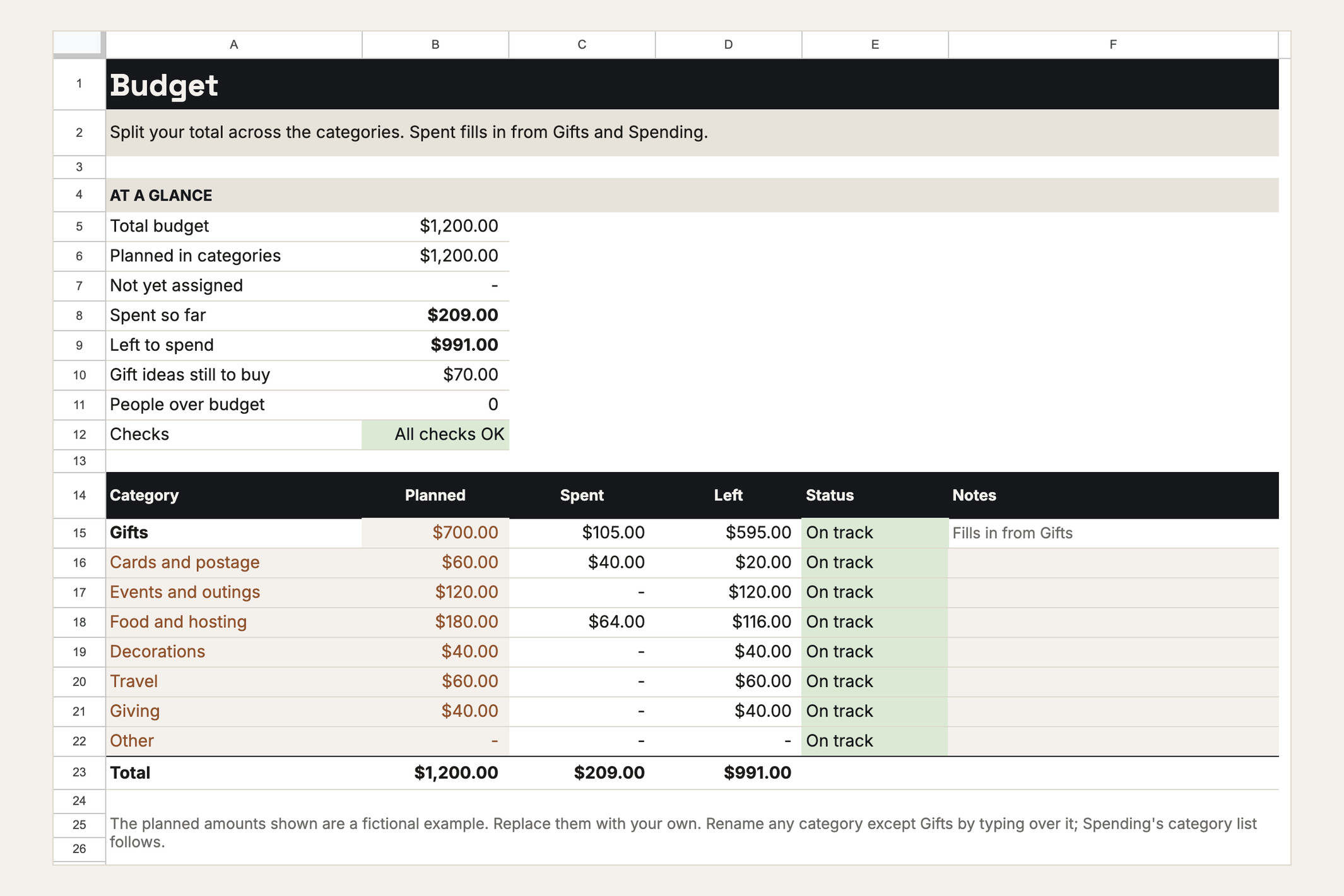
Split one total across eight categories. Spent fills in as you go.
Open larger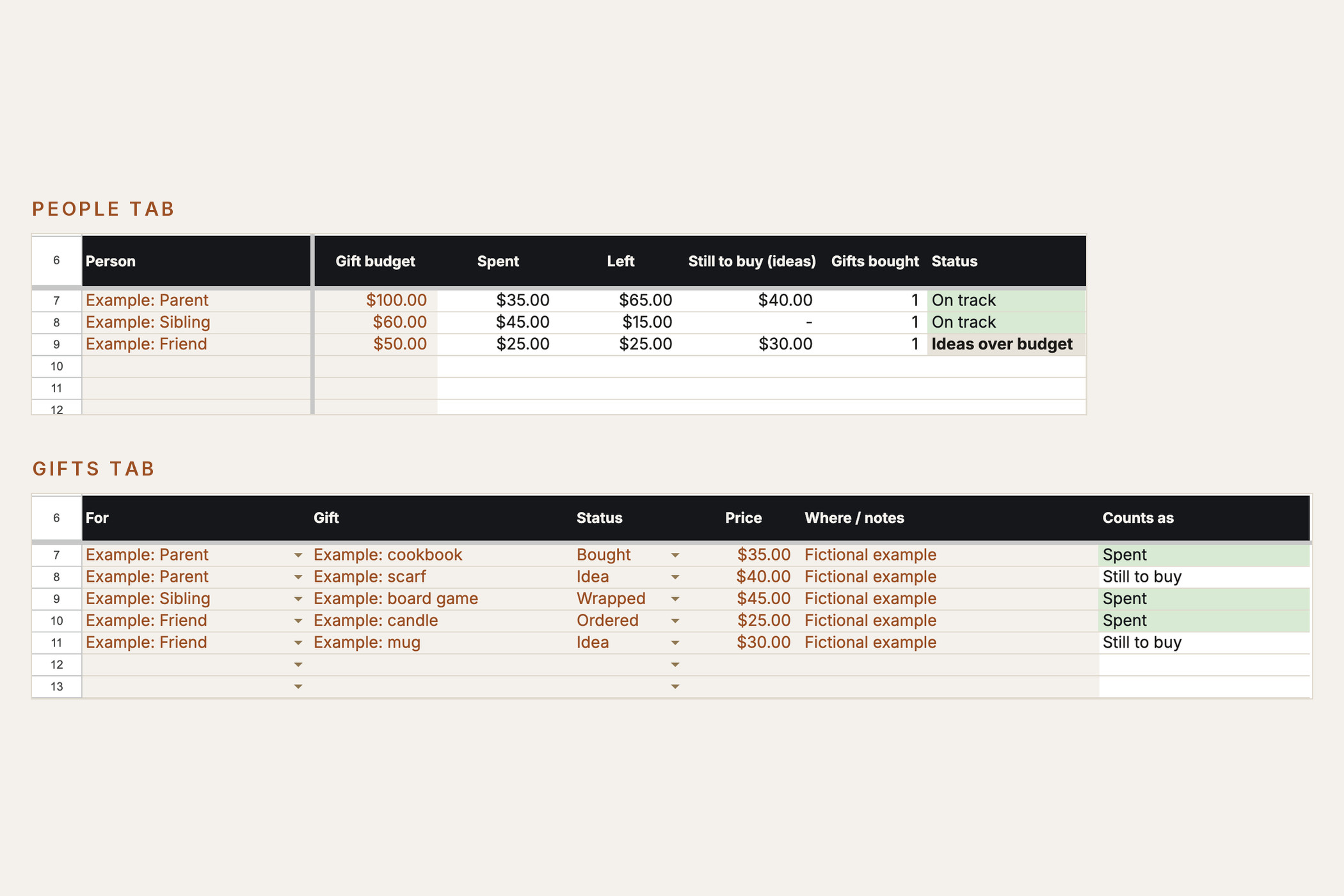
Give each person a budget and each gift a status.
Open larger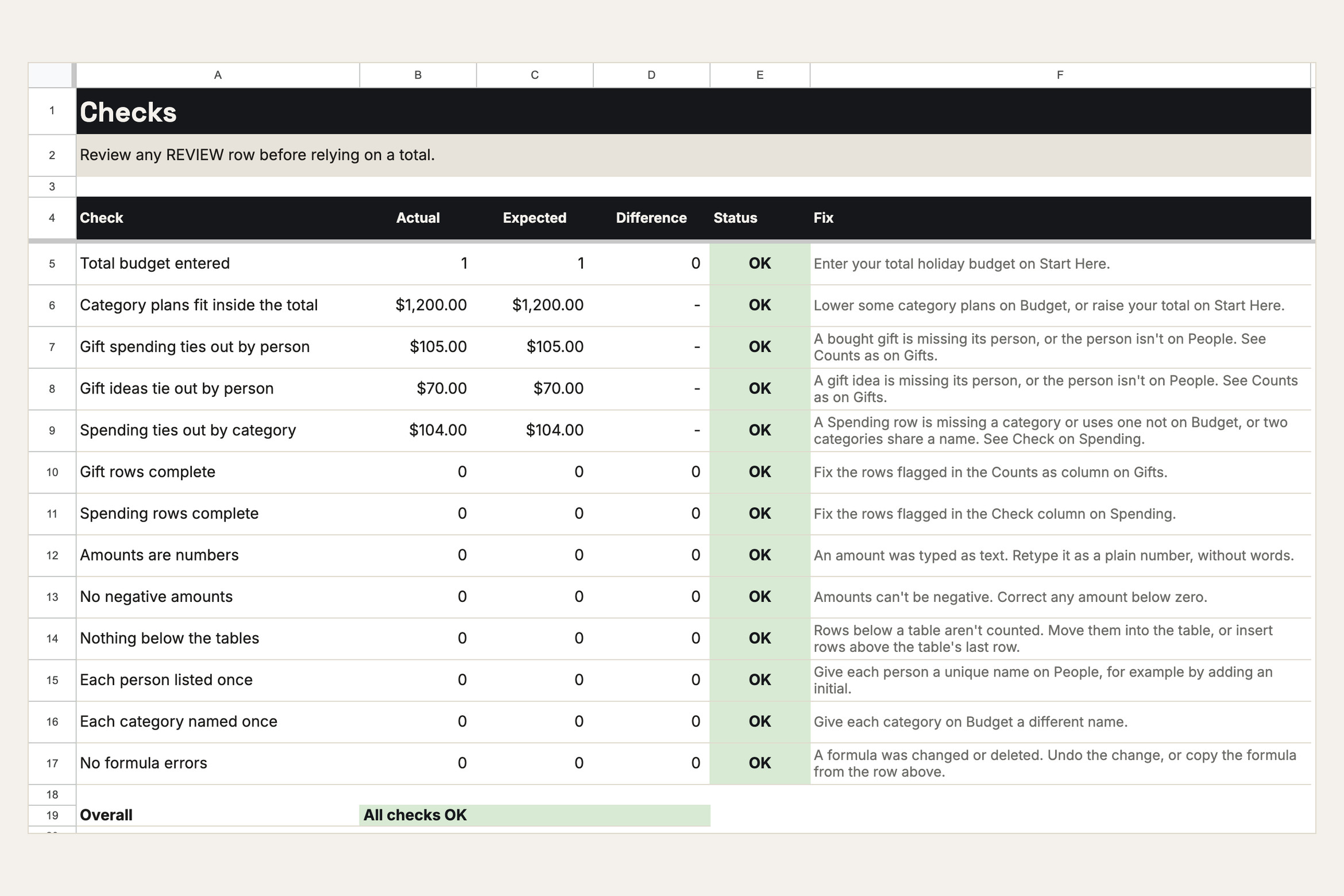
13 checks show whether the totals add up, and what to fix if they don't.
Open larger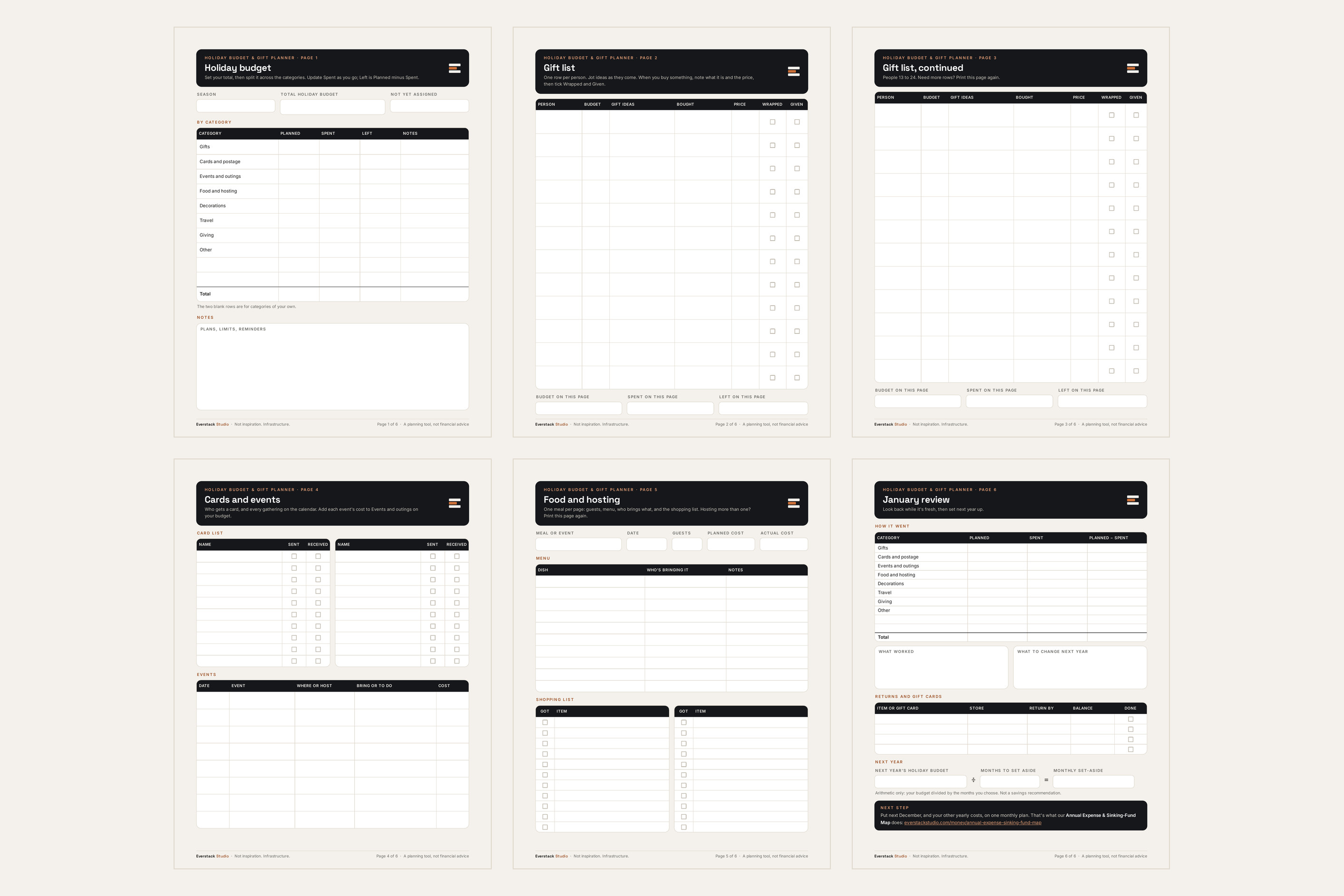
Six printable pages. Type into them on screen or print them, on US Letter or A4.
Open largerFiles in this download
- Holiday Planner — six printable PDF pages you can also type into on screen: holiday budget, gift list for up to 24 people, cards and events, food and hosting, and a January review. US Letter and A4.
- Holiday Tracker — an Excel workbook with Start Here, Budget, People, Gifts, Spending, January Review and Checks tabs. Room for 40 people, 150 gifts and 100 other purchases.
- Google Sheets copy — make your own copy of the tracker from the link in Start Here.
- Start Here PDF — your first ten minutes, how the totals work, and privacy and limits.
- License and Support PDF.
Your first session
- 1Pick where you'll work: the Excel tracker, the Google Sheets copy, or the printable planner.
- 2Set your total holiday budget.
- 3Add the people you buy for and give each a budget.
- 4Split your total across the eight categories.
- 5Add gift ideas as they come. When you buy one, set its status and the price you paid.
Annual Expense & Sinking-Fund Map
Put next December, and every other yearly cost, on a monthly plan.
Is this the right tool for you?
Good fit
Households that buy for a long list and want the season's budget, gifts, cards, events and hosting in one place.
Not designed for
Tracking bank or card transactions, following prices, or deciding what you can afford. It totals only the budgets and prices you enter.
What this product does and does not do
- The tracker is built for desktop Microsoft Excel on Windows or Mac. Apple Numbers isn't supported.
- The Google Sheets copy works in Google Sheets in a web browser and in the Google Sheets app. Making your copy needs a free Google account, and your entries are then stored in your Google account.
- The planner PDFs open in any PDF reader. To type into them, use a PDF reader that fills in forms.
- Formula cells are visible and editable, so keep an untouched copy of the tracker before you change any formulas.
- It totals the budgets and prices you enter. It doesn't connect to a bank or card, track prices, or tell you what to spend or whether you can afford it. The monthly set-aside is arithmetic only, not a savings recommendation.
- Don't enter card numbers, account numbers or passwords.
- For educational and planning purposes only; not financial, investment, tax, or legal advice.
License
Personal and household use: you may share it with people in your household for your household's planning. No resale, redistribution, public sharing, sublicensing, or commercial use. Fixes and minor updates may be issued at Everstack Studio's discretion for v1.x. Refunds follow the store policy shown at checkout.
See the refund policy and terms.
Common questions
Can I use Google Sheets instead of Excel?
Yes. Start Here has a link that makes your own copy of the tracker in Google Sheets. It works in a web browser and in the Google Sheets app, and you need a free Google account. Your entries are then stored in your Google account.
Do I need a spreadsheet at all?
No. The printable planner works on its own: print it, or type into it in a PDF reader that fills in forms. The tracker adds the math if you want it.
Does it connect to my bank or card?
No. It totals only the budgets and prices you enter. It doesn't connect to a bank or card or track prices.
Can I use it again next year?
Yes. No year is printed in the files, so they work every season. Keep an untouched copy of the tracker to start each season fresh.
Can I share it with my household?
Yes. The license covers personal and household use, so you can share the files or your Google Sheets copy with people in your household for your household's planning. Please don't share or resell them outside your household.
Are updates included?
Fixes and minor updates to the version you bought are free when we release them. A future major version is a separate product unless its page says otherwise.
What's the refund policy?
If you bought on everstackstudio.com, you can get a full refund within 7 days of your order. Email support@everstackstudio.com with your order number; you don't need to give a reason. If a file is broken, email us anytime and we'll fix it.
Plan the whole holiday season in one place
A printable planner and an Excel tracker, with a Google Sheets copy, for the season's budget, gifts, cards, events and hosting, plus a January look-back.
For educational and planning purposes only; not financial, investment, tax, or legal advice. Verify your own inputs and consult a qualified professional for decisions specific to you.