

Every statement checks back to a dated note.
Open largerPerformance review templates for managers, with a check before you send
Keep dated notes on each direct report, see where they're thin, draft from them, and check every statement against them before it goes into your employer's form. Excel and Word, or Google Sheets and Google Docs.
Review Cycle Kit for Managers
- Every statement in your draft checks back to a dated note about the same person.
- See whose notes are thin, or bunched in the last few weeks, before you write.
- Line up one person's notes by goal, with IDs, ready to write from.
- Calibrate side by side on your employer's scale, with a reason for every change.
- Track each review from request to conversation against dates counted back from your due date.
- Excel, Word and PDF, also tested in Google Sheets and Google Docs.
Local files
No account, and nothing is sent anywhere.
Editable files
Formula cells are visible and editable.
Real screens from the files you get
An evidence log, two Word templates, a writing guide and a calibration sheet that take one review cycle from the first note to the conversation.
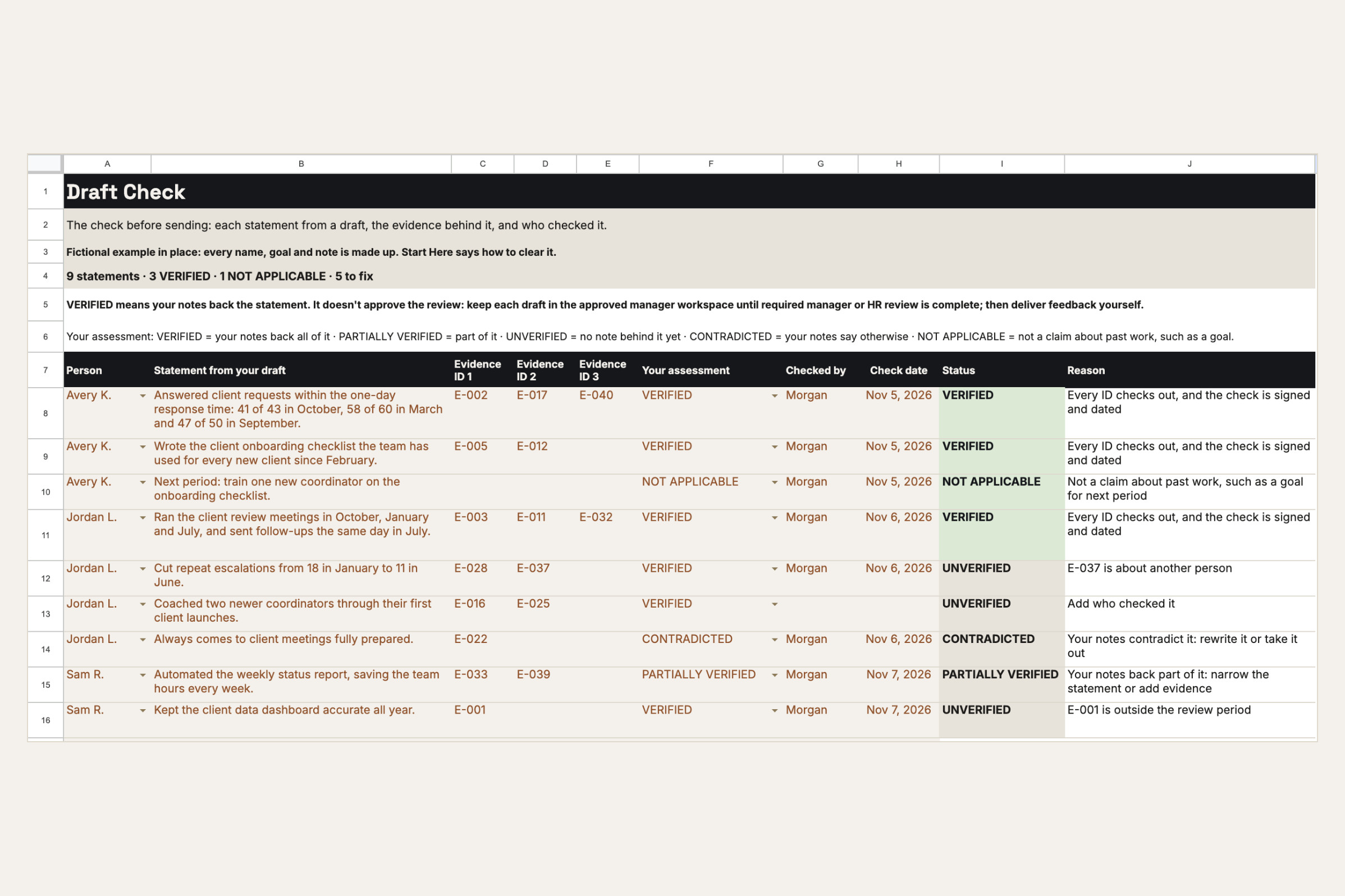
Draft Check: VERIFIED only when the trail is complete, and the reason in words when it isn't.
Open larger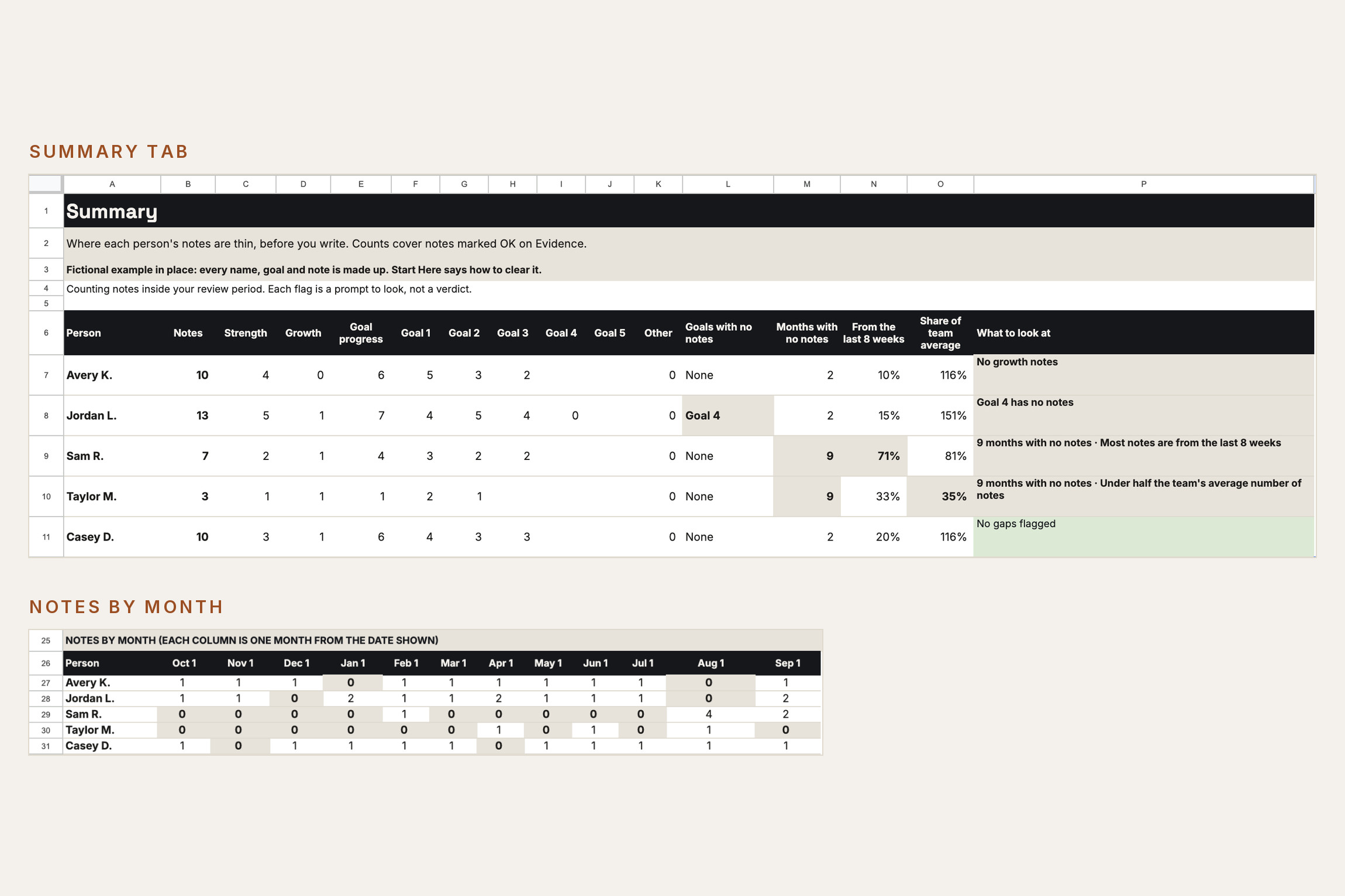
Summary: see whose notes are thin, or bunched in the last few weeks, before you write.
Open larger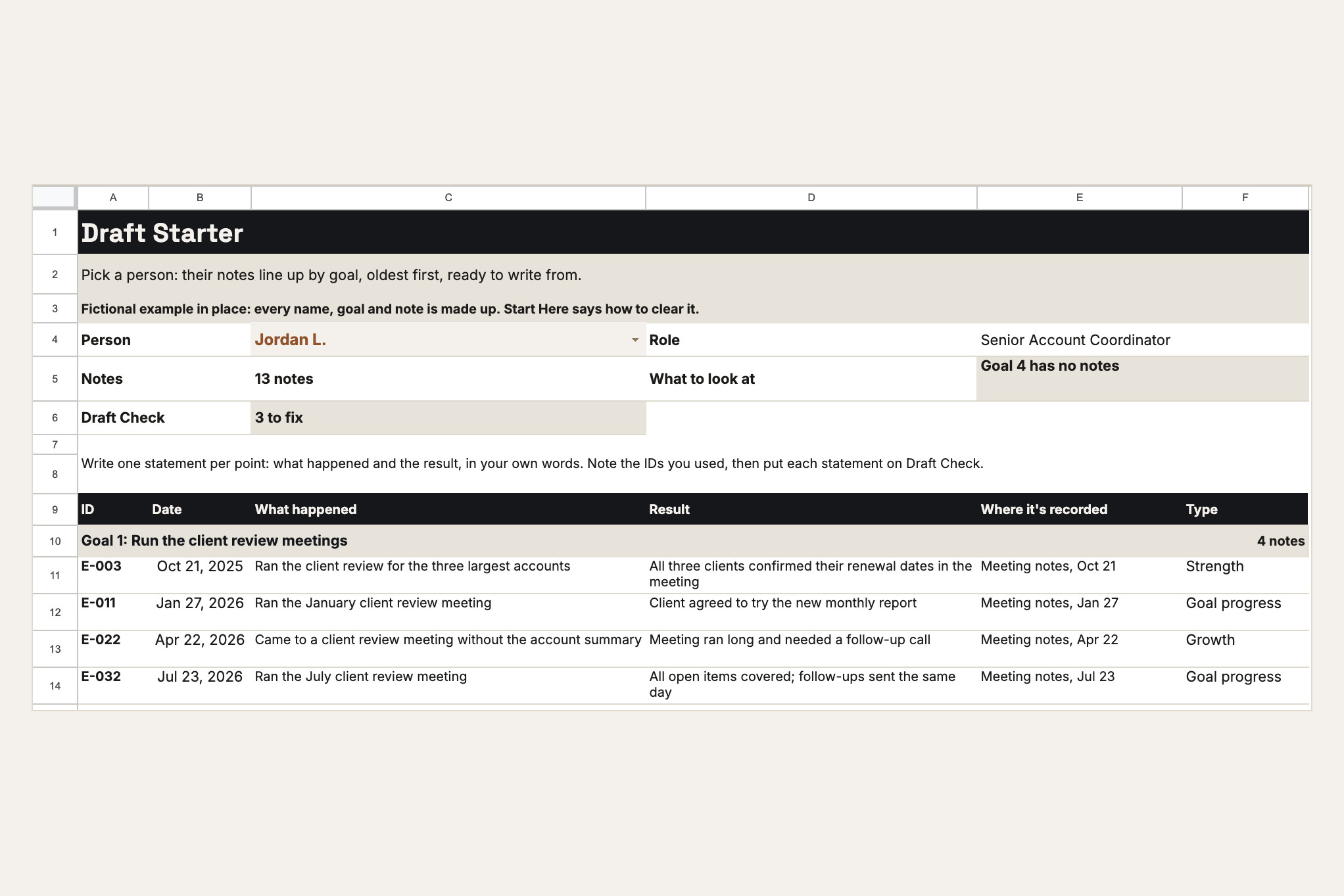
Draft Starter: one person's notes, lined up by goal, ready to write from.
Open larger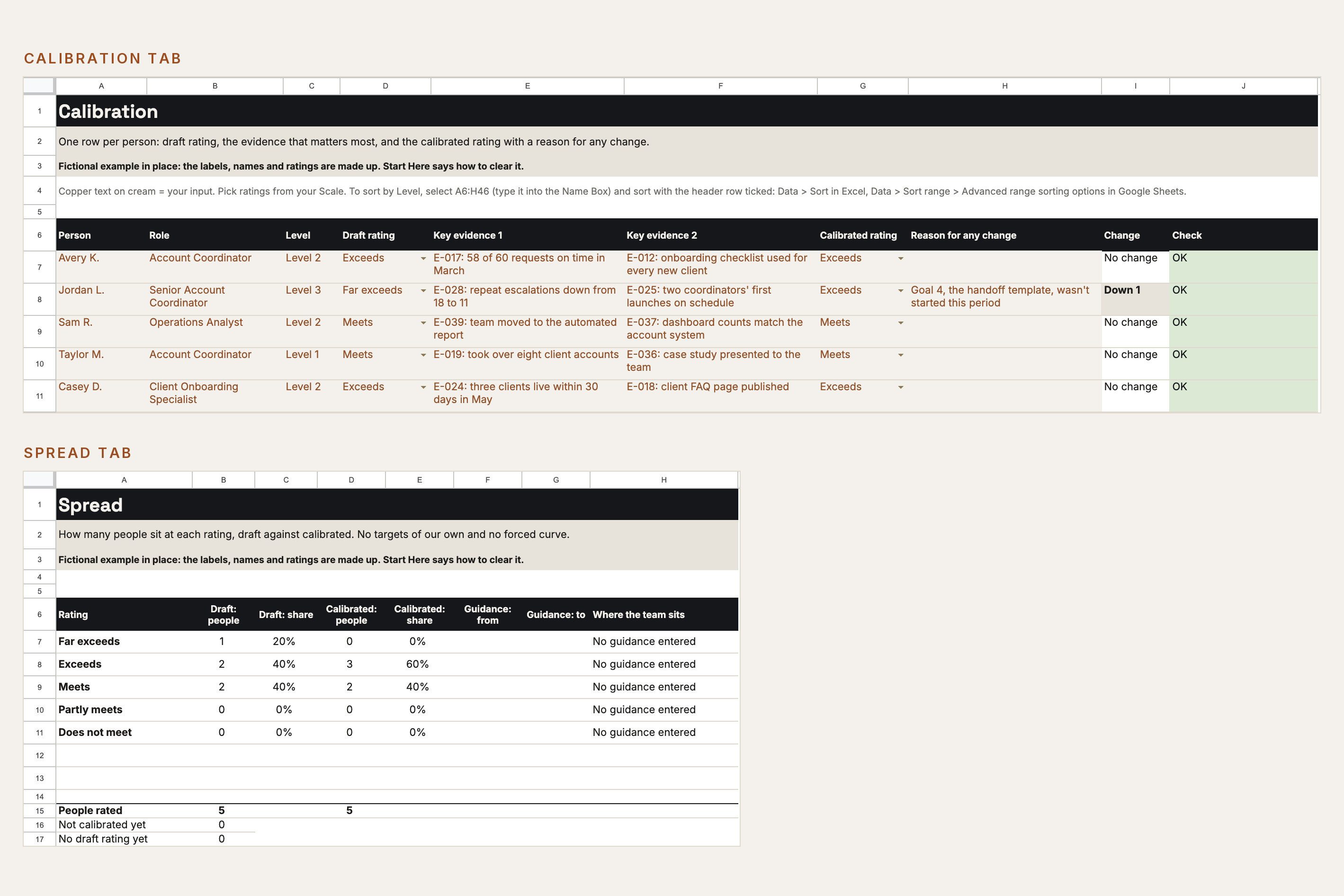
Calibration Sheet: draft ratings side by side on your employer's scale, with a reason for every change.
Open larger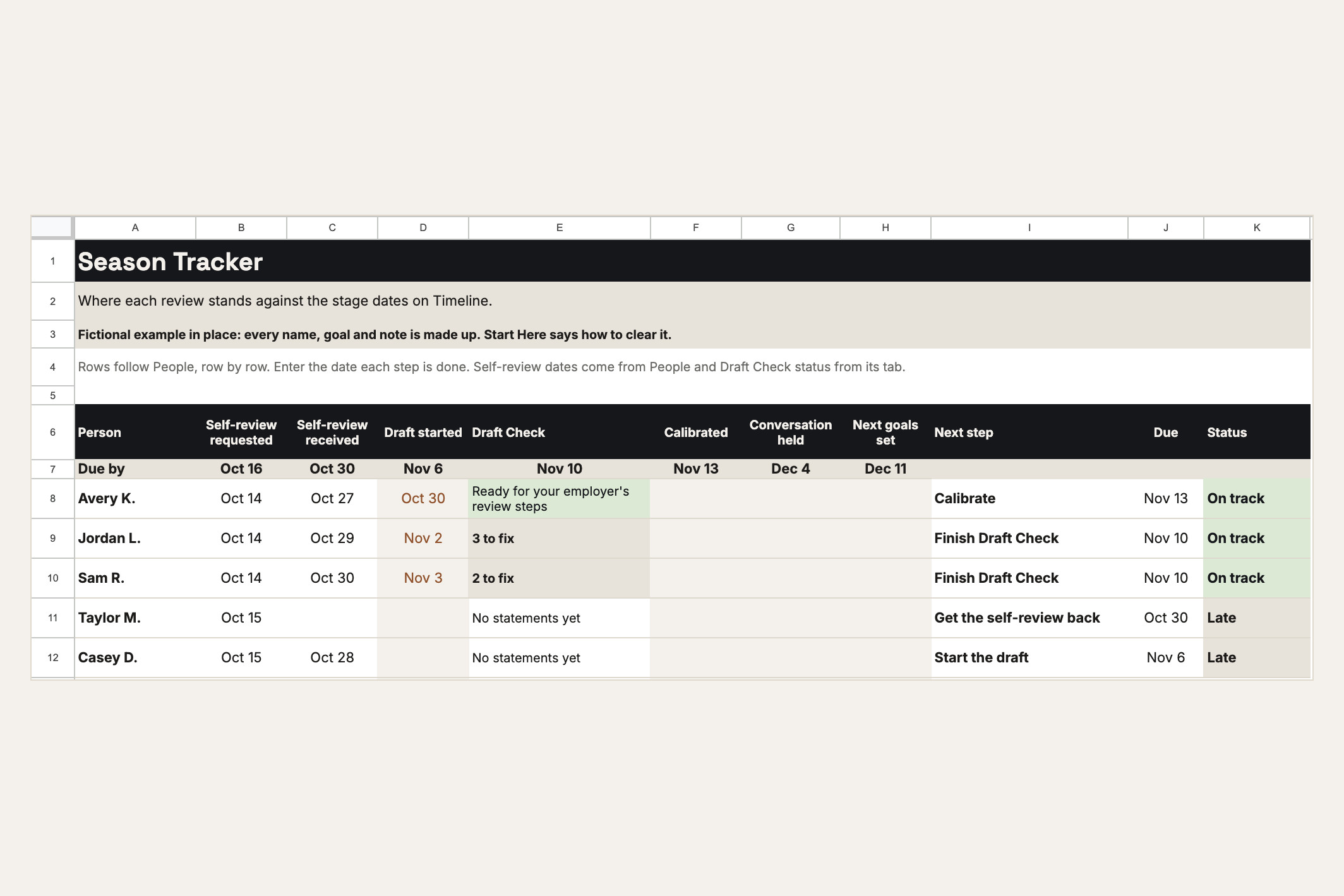
Season Tracker: where each review stands against dates counted back from your due date.
Open larger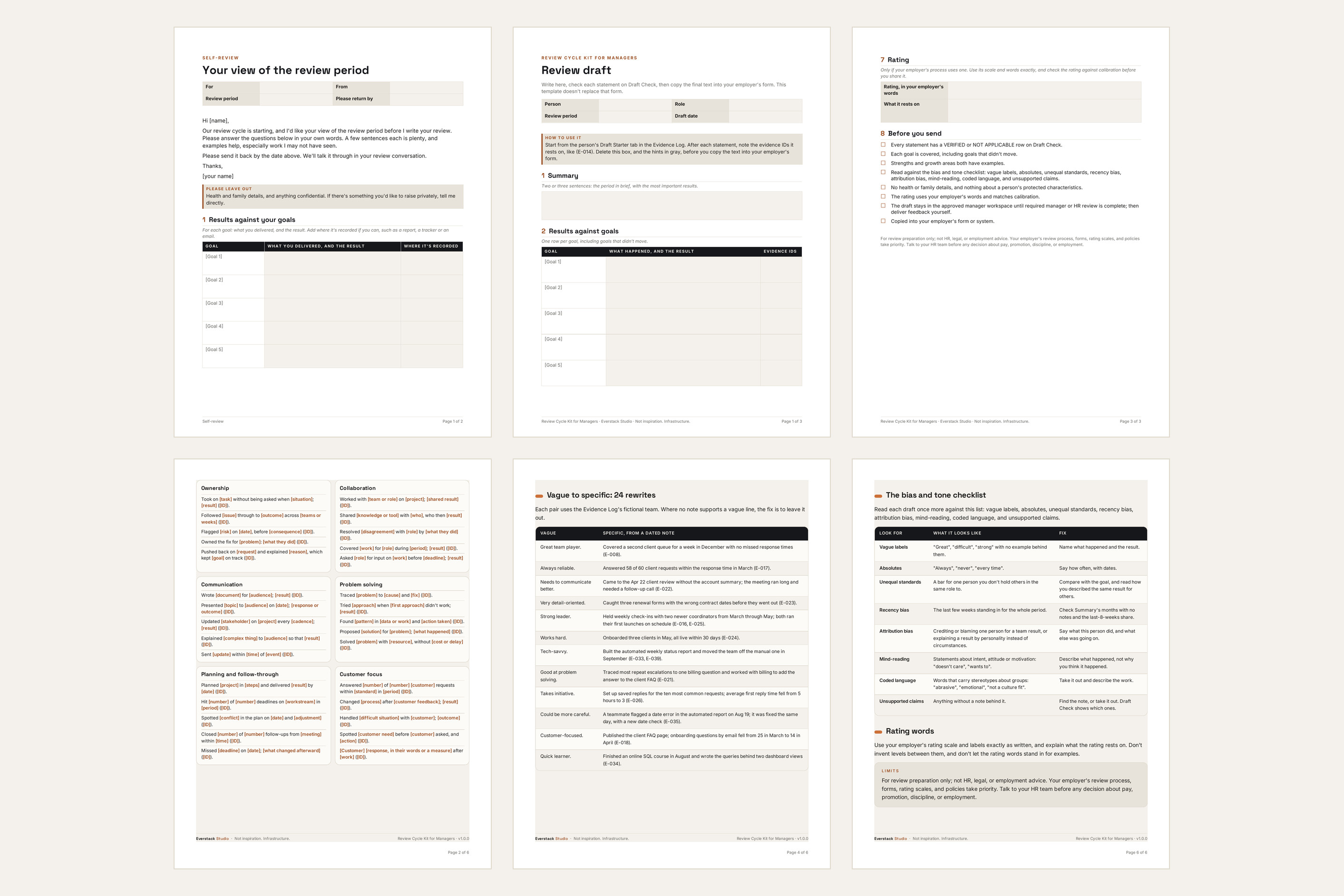
The two Word templates and the Writing Guide.
Open largerFiles in this download
- 01 Start Here (PDF) — your first 20 minutes, the file list, privacy and limits, and the Google steps.
- 02 Review Guide (PDF, 8 pages) — the cycle from first note to the conversation, a write-in timeline, the check before sending, calibration, the conversation, and when to bring in HR.
- 03 Evidence Log (Excel) — Timeline, People, Evidence, Summary, Draft Starter, Draft Check, Season Tracker and Checks tabs. Room for 15 direct reports and 500 notes.
- 04 Self-Review Request (Word, 2 pages) — the questions you send each direct report.
- 05 Review Draft Template (Word, 3 pages) — results against each goal with evidence IDs, strengths, growth areas, their view, next goals, the rating in your employer's words, and a before-you-send checklist.
- 06 Writing Guide (PDF, 6 pages) — 60 sentence frames in 12 areas, 24 vague-to-specific rewrites, and the bias and tone checklist.
- 07 AI Drafting Guide (PDF, optional) — three prompts that draft from your own notes, what never to paste, and the check before sending. Only if your employer allows AI for this.
- 08 Calibration Sheet (Excel) — your employer's rating labels, optional guidance, one row per person with a reason for every change, and the spread of ratings, draft against calibrated. Room for 7 labels and 40 people.
- 09 License and Support (PDF).
Your first session
- 1Open the Evidence Log and look around. It opens with a fictional team so you can see every tab working.
- 2Set your dates on Timeline: your review due date and review period. Each stage's date counts back from the due date.
- 3Add your direct reports on People: name or initials, role, and up to five goals each.
- 4Send each person the Self-Review Request.
- 5Log your first notes on Evidence. Each note gets an ID you'll use when you write and check each review.
The Manager Kit
For the rest of the year: the Manager Kit's nine workflows, including One-on-One Meeting Prep and the Performance Feedback Assistant.
Is this the right tool for you?
Good fit
A manager preparing reviews for their own direct reports who wants every statement backed by a dated note, and each draft checked before it goes into the employer's form.
Not designed for
It isn't HR software, a rating system, legal protection, or a stand-in for your employer's process. It has no improvement-plan or discipline templates, and it doesn't rate anyone or decide pay or promotion.
What this product does and does not do
- The workbooks are built for desktop Microsoft Excel on Windows or Mac, and the templates for Microsoft Word. Apple Numbers isn't supported.
- Google Sheets and Google Docs: upload the files to the Google Drive your employer approves for work files, then choose File, then Save as Google Sheets or Save as Google Docs. Start Here has the steps.
- The PDFs open in any PDF reader.
- Formula cells are visible and editable, so keep an untouched copy of each workbook before you change any formulas.
- It organizes the notes, ratings and drafts you enter. It doesn't rate anyone, decide pay or promotion, or check your employer's rules.
- Your final review goes into your employer's own form or system. It has no improvement-plan or discipline templates.
- The kit needs no account and sends nothing anywhere: your files stay wherever you save them. Keep notes about employees where your employer allows, under its record-keeping rules.
- Don't record health or family details, or anything about a person's protected characteristics. Local files aren't encrypted.
- For review preparation only; not HR, legal, or employment advice. Your employer's review process, forms, rating scales, and policies take priority. Talk to your HR team before any decision about pay, promotion, discipline, or employment.
License
One manager's own reviews. You may send the Self-Review Request to your direct reports and share filled-in files with the people in your review process. No resale, redistribution, or company-wide distribution. Fixes and minor updates may be issued at Everstack Studio's discretion for v1.x. Refunds follow the store policy shown at checkout.
See the refund policy and terms.
Common questions
Can I use Google Sheets and Google Docs?
Yes. Upload the files to the Google Drive your employer approves for work files, open each one, and choose File, then Save as Google Sheets or Save as Google Docs. Both workbooks and both Word templates were tested that way before release. There are no copy links: your files stay wherever you save them.
Does it rate my team or tell me what rating to give?
No. It organizes the notes, ratings and drafts you enter. You type your employer's rating labels, and the kit ships no scale, ranges or curve of its own. The rating is yours to decide, under your employer's process.
Do I need AI to use it?
No. The AI Drafting Guide is optional, for managers whose employer allows AI for this. Draft Check works on any draft, written with or without AI.
Where are my notes stored?
Wherever you save the files. The kit needs no account and sends nothing anywhere. Keep notes about employees where your employer allows, under its record-keeping rules. Local files aren't encrypted.
Can I share it with my team or my company?
The license covers one manager's own reviews. You may send the Self-Review Request to your direct reports and share filled-in files with the people in your review process, such as your own manager or HR. Please don't redistribute the kit across your company.
Can I use it again next review cycle?
Yes. Enter the new due date and review period on Timeline. Keep an untouched copy of each workbook to start each cycle fresh.
Are updates included?
Fixes and minor updates to the version you bought are free when we release them. A future major version is a separate product unless its page says otherwise.
What's the refund policy?
If you bought on everstackstudio.com, you can get a full refund within 7 days of your order. Email support@everstackstudio.com with your order number; you don't need to give a reason. If a file is broken, email us anytime and we'll fix it.
Performance review templates for managers, with a check before you send
An evidence log, two Word templates, a writing guide and a calibration sheet that take one review cycle from the first note to the conversation.
For review preparation only; not HR, legal, or employment advice. Your employer's review process, forms, rating scales, and policies take priority. Talk to your HR team before any decision about pay, promotion, discipline, or employment.